
localhost:5173 Explained: Vite's Default Port and How to Share It
What localhost:5173 is, why Vite chose that port instead of 3000, how to change it, fix load and HMR errors, and share your dev server publicly.

If you have ever entered npm run dev in a Vue, React, or Svelte project that is based on Vite,
then you’re probably no stranger to seeing localhost:5173 appear on your screen. This is the
default address to which Vite’s development (dev) server is automatically connected.
This guide will explain what the specified address is, why Vite chose this particular number, what services run on it and which ones don’t, even though they use the Vite platform, and how to set up and resolve any issues with a server on it.
The final part covers making that server reachable from another computer, using LocalXpose to give your local port a public URL without touching your router.
Quick Overview
Your local machine is addressed as localhost and the default port that Vite uses when it starts
its dev server is 5173. Together, http://localhost:5173 essentially refers to the Vite dev
server that is running on the same computer. By default, this connection is private, which is
exactly how it should be, no one from outside your machine can access it.
If you need to share access to your dev server with others, whether they’re on your team, are a client, or are connected through a service like Stripe or GitHub, then LocalXpose can do that for you.
You keep running your dev server exactly as you do now, and get a public HTTPS URL alongside it.
What localhost:5173 Actually Means
localhost resolves to 127.0.0.1 (or ::1 on IPv6), essentially the loopback address which
always points back to your own computer. So, any request made using it doesn’t actually leave your
computer. When you combine localhost with the number 5173, you’re telling your browser to connect
with the Vite program that is running on your own machine, not some other server. If you came here
looking for information on a different port number (like 3000 or 8080), then our guides
localhost:3000 and
localhost:8080 cover how they are used in Node, Rails, and Java
environments.
Sharing localhost:5173 With Someone Else
By default, localhost:5173 only works on your machine. Depending on who needs to reach it, there
are two ways around that.
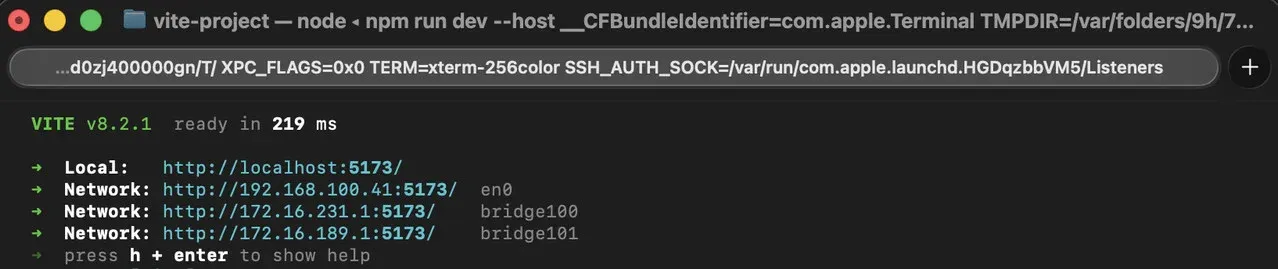
When on the same network, Vite already tells you how in its startup output:
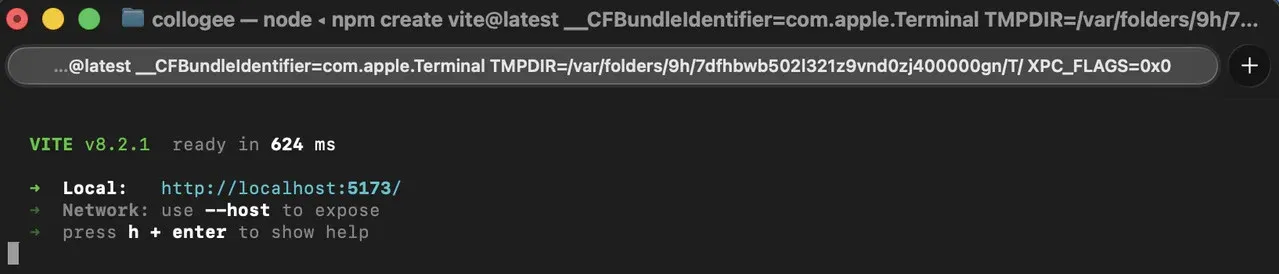
When you run the command npm run dev -- --host or server.host: true in vite.config.js, Vite
binds to 0.0.0.0. People who connected to the same local network as you can access your app by
going to http://YOUR-LAN-IP:5173 in their web browser.
When on different networks is where a tunnel comes into play: it gives your local port a public URL without opening ports on your router or exposing your machine directly.
Install LocalXpose with whichever method matches your platform. The free tier covers everything in this section:
# Any platform with Node.js
npm install -g loclx

# macOS (Homebrew)
brew install --cask localxpose

# Linux (Snap)
sudo snap install localxpose

# Windows (Chocolatey)
choco install localxpose
Sign up for a free LocalXpose account, copy your access token from the dashboard, then sign in from the terminal:
loclx account login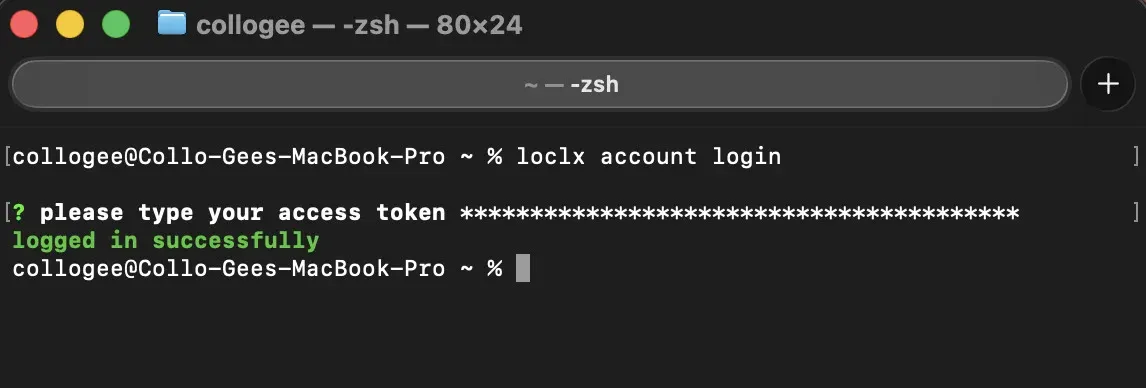
Then point it at your dev server:
loclx tunnel http --to localhost:5173
You receive a public HTTPS address forwarding straight to your dev server.
To use a URL that doesn’t change every time you restart the tunnel, reserve a subdomain:
loclx tunnel http --to localhost:5173 --subdomain myviteproject
Custom subdomains are a Pro feature; the free tier assigns a random one.
Note: Your application will initially load from the provided URL without any problems. However, there is one more thing you need to take care of in order for Vite’s live update (or “hot reload”) feature to continue working properly after you have it running through a tunnel. We will cover that in the “won’t load” section.
Why Vite Uses Port 5173, Not 3000
Until Vite 3, Vite did not default to port 5173. In its earlier versions, it followed the same
default port of 3000 that is used by several other popular tools like Rails, Express, Create React
App, and Next.js. The change landed in the pull request titled
feat!: vite dev default port is now 5173 (#8148),
which also replaced every reference to the old default 3000 across Vite’s documentation and source
code with the new one.
The number itself is a deliberate easter egg, and the Vite team has said so on the record. In the
discussion on an earlier PR about the preview port
(#6330), Vite team member Shinigami92 wrote that the
team had considered 5173 at a team meeting because it reads as Vite in leetspeak: V I T Ǝ, with
the 5 standing in for the Roman numeral V. There was a practical argument alongside the joke,
which is the one that carried the decision: 5173 collides with far fewer tools than 3000 does.
What Runs on Port 5173 (and What Doesn’t, Despite Using Vite)
Vite is the build tool and dev server sitting underneath a large part of the modern frontend ecosystem. Most projects never install it on its own, though. You start from a framework’s own scaffolding command, and that command wires up Vite for you.
| Tool | Scaffold command | Default port |
|---|---|---|
| Vite core | npm create vite@latest | 5173 |
| Vue 3 | npm create vue@latest | 5173 |
| React (via Vite) | npm create vite@latest -- --template react | 5173 |
| SvelteKit | npx sv create | 5173 |
| Solid | npm create vite@latest -- --template solid | 5173 |
| Qwik | npm create vite@latest -- --template qwik | 5173 |
Two widely used frameworks are built on Vite but do not serve dev on 5173 at all:
Astro uses port 4321 by default. The choice keeps it clear of the ports other dev servers commonly grab, and it fits Astro’s space branding: 4-3-2-1 is a countdown to launch.
Nuxt uses port 3000. nuxt dev doesn’t hand the dev server over to Vite. It starts the server
through Nuxt’s own CLI, which listens on 3000 via listhen, so Vite’s 5173 default never surfaces.
Nuxt 4 is the current major version; Nuxt 3 reached end of life on 31 July 2026. The dev port is
3000 in both.
Therefore, if your project uses Vite but starts on a port other than 5173, such as 4321 or 3000, you’re most likely looking at Astro or Nuxt rather than a misconfiguration. Check which framework you’re in before assuming something is broken.
localhost:5173 vs. localhost:4173: Dev Server vs. Preview Server
Vite actually ships two separate default ports, and mixing them up is a common source of confusion.
Running vite or npm run dev starts the dev server on 5173. It serves your source files as
native ES modules, without bundling them first, and it wires up hot module replacement (HMR) so
edits show up in the browser instantly.
Running vite preview starts a completely different process on 4173. This one serves the actual
production build from your dist/ folder, the same files you’d deploy, with no HMR and no
on-the-fly transforms. It’s meant for a final smoke test before you ship, not for day-to-day
development.
They’re not interchangeable. A bug that only shows up in vite preview and not in vite dev (or
the reverse) usually means something environment-specific, like an import that only resolves in the
bundled output, rather than a fluke.
Starting a Vite Dev Server on 5173
None of these need any port configuration. Vite handles it out of the box.
React:
npm create vite@latest my-app -- --template react
cd my-app
npm install
npm run dev
Vue:
npm create vue@latest my-app
cd my-app
npm install
npm run dev
Svelte:
npx sv create my-app
cd my-app
npm install
npm run dev
Solid:
npm create vite@latest my-app -- --template solid
cd my-app
npm install
npm run dev
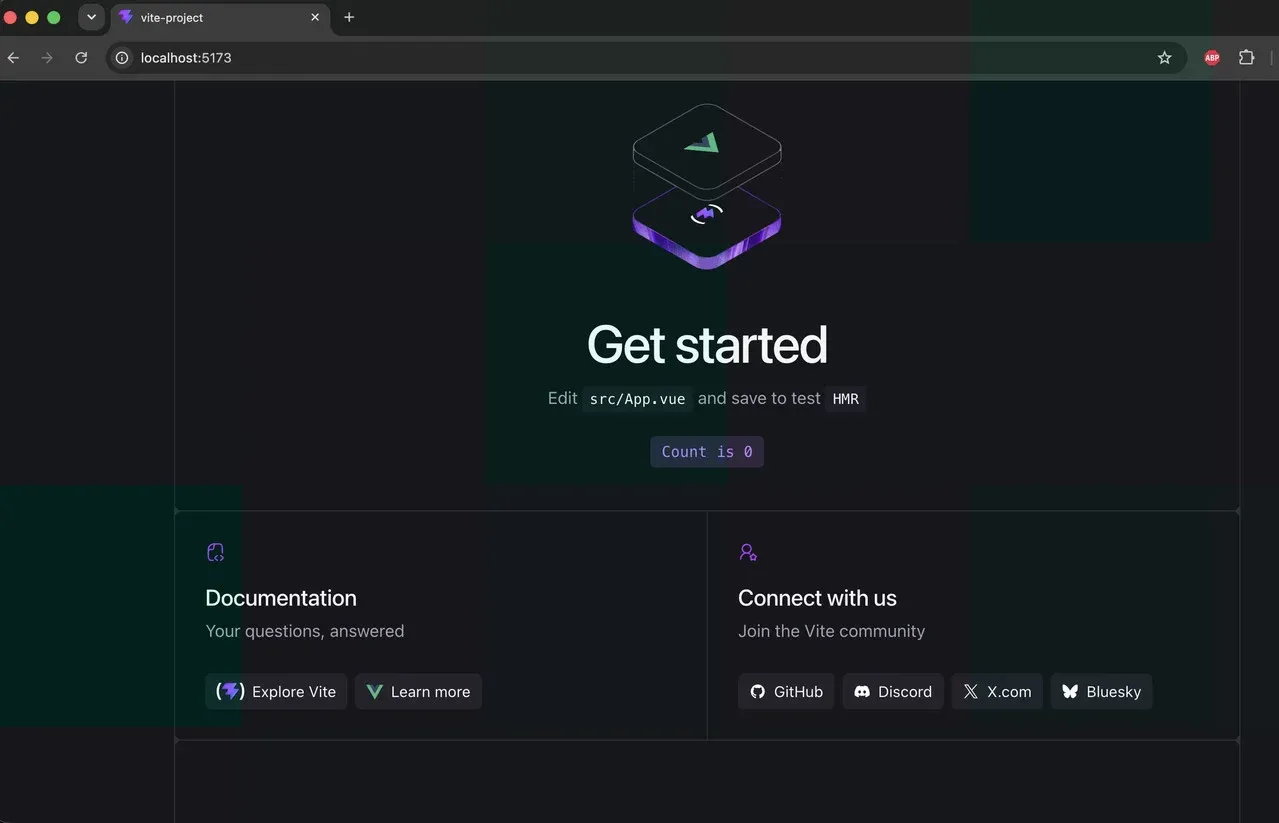
Each of these prints the same kind of startup message once running, with http://localhost:5173/ as
the local address.
Changing the Port, and Why “Port in Use” Looks Different Here
To set the default port permanently, add the following to your vite.config.js file:
import { defineConfig } from 'vite';

export default defineConfig({
  server: {
    port: 3001,
    strictPort: true,
  },
});
port is the port Vite tries first. strictPort: true tells Vite to exit with an error if that
port is taken, instead of quietly moving to the next free one. Both exist as CLI flags too:
vite --port 3001 --strictPort.
That second option matters more than it looks. Most Node or Express servers stop with an “address
already in use” error (EADDRINUSE) when the port they want is occupied. Vite doesn’t. If 5173 is
busy it tries 5174, then 5175, and so on, then logs whichever port it ended up on. That’s convenient
when you’re running two projects side by side, but it quietly breaks anything that expects a fixed
URL: an OAuth callback, a CORS allowlist, a webhook, a tunnel you started against 5173. Setting
strictPort: true turns that silent fallback back into a loud failure, which is usually what you
want once other services point at the port.
Why localhost:5173 Won’t Load (and How to Fix It)
Nothing on 5173 at all. Before you assume that the server has crashed, first check and see if it has actually moved over to 5174 or a higher number. You can find out what port it has actually landed on by looking at the terminal output.
A full-screen error overlay instead of your app. When a file has a syntax or runtime error, Vite covers the page with an overlay naming the file, the line, and the stack trace. This is a compile error in your code, not a crashed server. The server is still running, and the overlay clears as soon as you fix the file and save.
A blank page with no overlay and no console errors.
This one is almost always a path problem in your own project rather than a fault in the Vite server.
Two causes account for most of it. The first is base: Vite serves from the project root / by
default, and if base is set to something that doesn’t match where the app is actually being served
from, the browser requests your JavaScript and CSS from a path that doesn’t exist and renders
nothing. The second is history fallback in a single-page app: the homepage loads, but a direct hit
on a deep route returns 404 because the request never falls back to index.html. If / works and
/some/route doesn’t, check your router setup and base first.
CORS errors between your app and a separate API. If your Vite application, which is running on
port 5173, tries to connect with an API that is hosted on a different port, such as a Django or
Express back-end on port 8000, the browser will still see this as a cross-origin request. It doesn’t
matter that the hostname is the same. Fix this through adding the right
Access-Control-Allow-Origin header on the API, or use Vite’s built-in server.proxy option to
route those calls through the dev server so they look same-origin to the browser.
“WebSocket connection failed” or “server connection lost, polling for restart.” This is most likely due to the fact that you have Vite set up behind a proxy or a tunnel. Same problem that causes hot reload to stop working when someone is testing on their phone from a local area network (LAN) using a non-standard hostname. Vite uses its own special kind of connection called a WebSocket for its Hot Module Replacement (HMR). By default, it is under the impression that the browser is connected directly to the same exact address and port that is displayed in the web page’s address bar. However, when a reverse proxy or tunnel is placed in front of it, then this assumption is no longer true.
To fix this you need to allow the public hostname and tell Vite’s HMR client the correct public
address to use in vite.config.js:
export default defineConfig({
  server: {
    host: true,
    allowedHosts: ['myviteproject.loclx.io'],
    hmr: {
      host: 'myviteproject.loclx.io',
      protocol: 'wss',
      clientPort: 443,
    },
  },
});
You should replace myviteproject.loclx.io with the actual address where you are hosting your site,
either a reserved subdomain from LocalXpose, a co-worker’s proxy, or your LAN IP address. Any proxy
that acts between the browser and the Vite server has to forward the WebSocket upgrade request, and
also, Vite must know which public URL it will be expecting. Check with the provider that you’re
using to see if they do forward WebSocket traffic because the above solution only addresses the Vite
side of things.
Note on allowedHosts: since Vite 6.0.9 (backported to 5.4.12 and 4.5.6), the dev server checks the
incoming Host header against server.allowedHosts and blocks anything that isn’t on the list.
That check is why the tunnel hostname has to be in the config above and not only in the hmr block.
A “Blocked request, this host is not allowed” message when going through a tunnel or a custom local
domain means you’ve hit it.
Note on hmr: as of Vite 8 the WebSocket options (protocol, host, port, path, clientPort,
timeout, server) moved from server.hmr to server.ws, leaving server.hmr for the on/off and
overlay toggles. The old keys are synced automatically and still work, so the config above runs on
Vite 5 through 8. On Vite 8 you can write the same three lines under ws: instead.
Find and Free Port 5173
How to know what’s actually holding the port:
Linux:
ss -ltnp | grep :5173
# or
sudo lsof -i :5173
macOS:
lsof -nP -iTCP:5173 -sTCP:LISTENWindows (PowerShell or Command Prompt):
netstat -ano | findstr :5173The outputs show a process ID. Stop it with kill -9 <PID> on Linux and macOS, or
taskkill /PID <PID> /F on Windows, then restart your dev server.
Frequently Asked Questions
What is localhost:5173?
The address that Vite’s dev server defaults to, 127.0.0.1 on port 5173. This is a private
address and will only be accessible from your own computer, unless you explicitly open it up using
the --host option or a tunnel.
Why did Vite move off port 3000?
Vite initially used 3000, but later changed to 5173 in order to avoid conflicts with several other development tools like Express, Rails, and Next.js, which all also use the default port of 3000.
Why does my dev server sometimes start on 5174 instead of 5173?
If 5173 is already in use, Vite will try the next available port instead of stopping. You can change
this behavior by setting strictPort: true in your configuration, this will make it error out
instead.
What’s the difference between localhost:5173 and localhost:4173?
The main difference is that 5173 is for the dev server which loads and re-loads from the non-bundled
source files. 4173, on the other hand, is what vite preview uses to serve the actual production
build from the dist/ folder. Both run different code, and should not be used interchangeably.
Why does my app load through a tunnel but hot reload stops working?
Vite’s HMR uses a separate WebSocket connection, and by default it expects to be talking to the same
host the browser shows in the address bar. Behind a tunnel or proxy that isn’t true, so you need to
add the public hostname to server.allowedHosts and set the public host and client port under
server.hmr (or server.ws on Vite 8) so they match the public address.
Is localhost:5173 the same across Vue, React, and Svelte projects?
Yes, as 5173 comes from Vite itself and not from the specific framework being used. So, for example,
a Vue app made with create-vue and a React app made with create-vite will both end up on 5173 by
default.
Conclusion
Vite uses the non-standard port 5173 because it was a deliberate decision to avoid conflicts with other applications. As a result, Vite has some unique characteristics, including the need for a separate preview port and a WebSocket connection with additional setup when a proxy is in place. You also get a port fallback that increments automatically instead of failing, which the plain Node and Express servers most developers come from don’t do.
To start a Vite application on port 5173, it only takes one command. However, if you want people who aren’t on the same machine as the server to be able to view and interact with your Vite site in real-time, with live updates happening automatically, you’ll need one more step than what’s required for a standard Express or Next.js application on port 3000. To resolve this, LocalXpose can be used to handle tunneling and offer a stable public URL.
