
LocalTunnel Alternatives - 4 Tools for Exposing Your Local Server
Discover the best LocalTunnel alternatives for 2026. Compare features, protocols, pricing, and reliability to find the right localhost tunneling tool for you

LocalTunnel has earned its place in many developers’ toolkits. It’s free, open-source, and gets you
a public URL with just npm install -g localtunnel and lt --port 3000.
But simplicity comes with trade-offs. LocalTunnel only supports HTTP and HTTPS, which means no TCP or UDP tunneling for database testing, game servers, or IoT devices. Every time you restart your tunnel, you get a new random URL, making webhook integrations impractical.
If you’ve found yourself working around these limitations, this guide covers four LocalTunnel alternatives that address different needs.
Why Developers Seek LocalTunnel Alternatives
LocalTunnel works well within its scope, but several constraints push developers to explore other options.
The HTTP-only limitation is the biggest issue. If you need to expose a TCP service like a PostgreSQL database or a UDP-based application like a game server, LocalTunnel can’t help.
Random URLs on each restart create friction for webhook integrations with services like Stripe or GitHub. Having to update webhook URLs every time you restart your development session gets old quickly.
Reliability can be a concern with free, volunteer-maintained services. When you’re demonstrating work to stakeholders or debugging time-sensitive issues, service availability becomes important.
The lack of custom domain support and traffic inspection tools also becomes noticeable for professional presentations or when debugging webhook payloads.
More importantly, LocalTunnel hasn’t been under active maintainance for a while, which makes it less reliable overall.
Best LocalTunnel Alternatives
Here are the best LocalTunnel alternatives to consider for your needs:
- LocalXpose - Full protocol support with developer-friendly features
- Serveo - SSH-based tunneling with zero installation
- Pagekite - Python-powered solution with persistent URLs
- Cloudflare Tunnel - Enterprise-grade infrastructure with Zero Trust integration
1. LocalXpose: LocalTunnel’s Feature-Complete Evolution
LocalXpose takes the core idea behind LocalTunnel and builds a complete development tool around it. Where LocalTunnel stops at HTTP/HTTPS, LocalXpose supports TCP, TLS, and UDP protocols. Where LocalTunnel gives you random URLs, LocalXpose offers custom domains and persistent subdomains.
Installation takes one command, and starting a tunnel and
exposing your localhost requires just
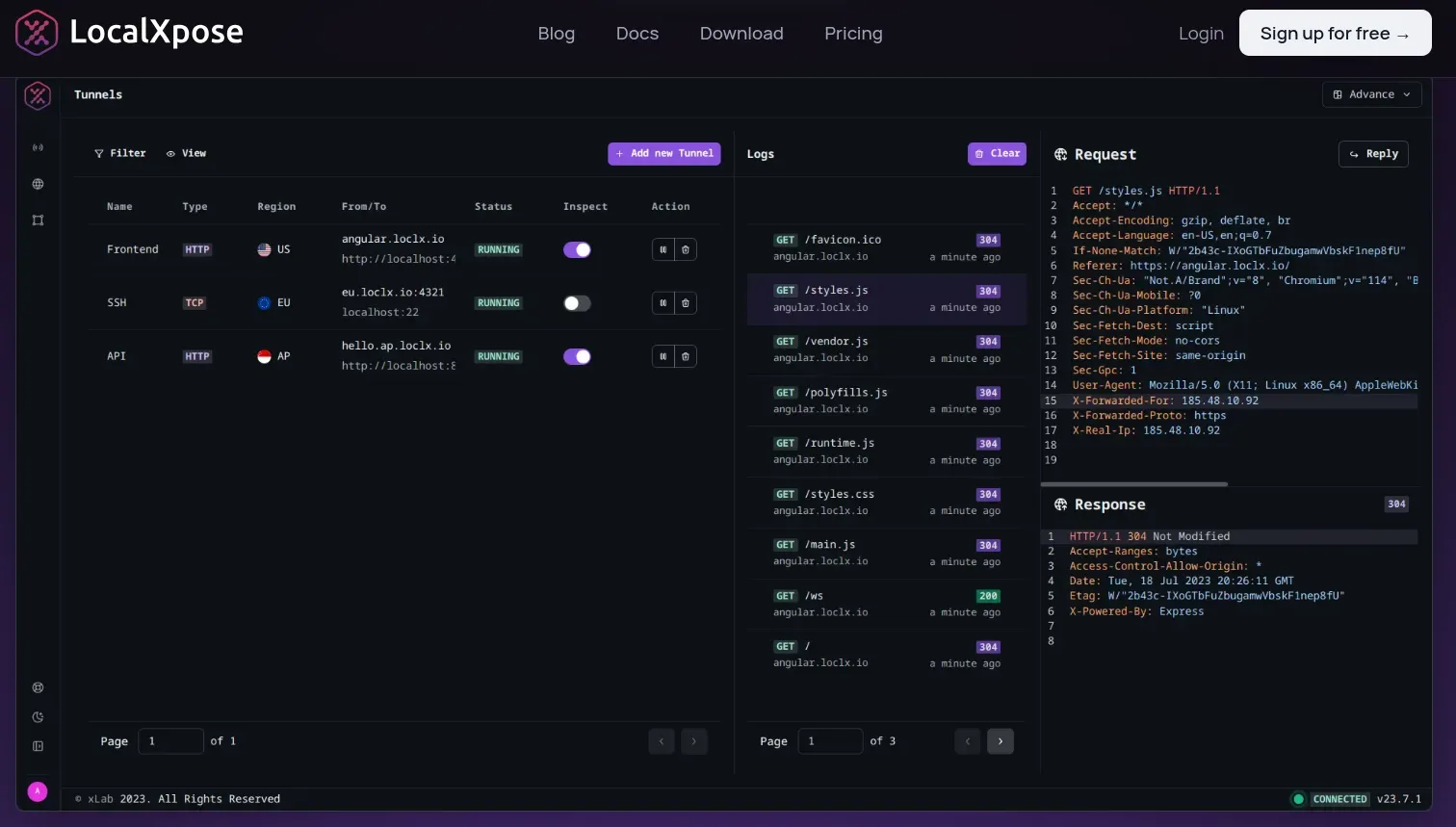
loclx tunnel http --to 3000. You get traffic logging, webhook replay capabilities, and stable URLs
that persist across sessions.
LocalXpose Pros
LocalXpose is easy to use and cheap. I use it to run Minecraft servers and it works smoothly. - (From a Reddit user)
LocalXpose offers multi-protocol networking support that opens doors that LocalTunnel can’t:
- PostgreSQL testing: TCP tunnel for remote database connections
- Game servers: UDP support for low-latency multiplayer communication
- IoT devices: Secure UDP protocols like CoAP/DTLS
- Single solution: No switching between tools for different protocols
The traffic inspection interface shows exactly what’s hitting your endpoints in real-time. When debugging webhooks, you see the raw request payload, headers, and timing without external logging. Request replay lets you resend the same payload multiple times while iterating on your handler logic.
For webhook integrations, custom subdomain reservations mean you configure your Stripe or GitHub webhooks once. The URLs don’t change when you restart your tunnel. Custom domain support (with wildcard capabilities) lets you use your own domain for professional demos or white-label applications.
LocalXpose Cons
LocalXpose doesn’t support being used as a library for programmatic integration. Some advanced features like custom domains and team collaboration are only available on paid plans.
The free tier offers 2 active HTTP tunnels, while the Pro plan costs $8/month with 10 active tunnels and unlimited bandwidth across all protocols.
When LocalXpose Makes Sense
LocalXpose works particularly well when you’ve outgrown LocalTunnel’s limitations but don’t need enterprise infrastructure. If you need multi-protocol support, reliable uptime, or developer-focused debugging tools, it delivers without requiring complex setup or expensive plans. The combination of comprehensive protocol support and transparent pricing makes it suitable for everything from solo development to enterprise team environments.
2. Serveo: SSH-Based Simplicity
Serveo uses SSH for tunneling. The entire setup is one command:
ssh -R 80:localhost:3000 serveo.net. No installation, no account creation, no configuration files.
This SSH-based approach appeals to developers comfortable with command-line workflows. Custom subdomain support is available if you want something more memorable than a random string.
Serveo Pros
Serveo offers a free tier with 3 active SSH tunnels and custom subdomain support. The Pro plan costs $6/month and provides unlimited active tunnels with no interstitial warning page and priority support.
For occasional use by developers who don’t want to install another tool, the SSH approach is convenient.
Serveo Cons
The simplicity comes with limitations:
- No traffic inspection: No web dashboard, GUI, or request replay
- Reliability concerns: A November 2025 discussion noted “it’s down for about 4 days it seems now”
- No UDP support: Supports HTTP/HTTPS and TCP only
- SSH requirement: Won’t work in restrictive corporate environments
For a free service maintained by volunteers, extended outages happen. If you’re planning to use it for anything time-sensitive, having a backup option ready is wise.
3. Pagekite: The Python-Powered Option
Pagekite has been around longer than most tunneling services. Built in Python, it supports HTTP, HTTPS, and SSH tunneling with persistent URLs that remain constant across sessions.
Configure a webhook URL once in your external service, and it keeps working across development sessions. For longer-term projects, this stability reduces friction.
Pagekite Pros
Pagekite offers a 31-day free trial with 2.5GB of data transfer to test the service. Paid plans start at $4/month for increased quotas and custom domain support.
The persistent URL feature makes it worth considering if you’re maintaining long-running test environments where webhook URLs need to remain stable for weeks or months.
Pagekite Cons
The tool shows its age in a few ways:
- Python requirement: Needs Python installed before you can use it
- Dated UX: Interface reflects older web development practices
- Basic authentication: Username/password only, no OAuth
- Limited protocols: HTTP, HTTPS, and SSH only - no TCP or UDP
- Smaller community: Fewer integrations and troubleshooting resources
4. Cloudflare Tunnel: When You Need Enterprise Infrastructure
Cloudflare Tunnel operates at a different scale than tools designed specifically for localhost tunneling. As part of Cloudflare’s Zero Trust platform, it brings enterprise-grade security to exposing local services.
You install the cloudflared daemon on your machine, which establishes outbound connections to Cloudflare’s network. No inbound ports need to be open on your firewall.
Cloudflare Tunnel Pros
Enterprise capabilities that go beyond basic tunneling:
- DDoS protection: Built-in mitigation for distributed attacks
- Web Application Firewall: Automatic security filtering
- Global edge network: Low latency regardless of user location
- Identity integration: Works with existing SSO providers
- Zero inbound ports: Outbound-only connections improve security
These features make sense for production workloads and team environments. For simple webhook testing or demos, it might be more than you need.
Cloudflare Tunnel Cons
Setup requires more steps than other options. You’ll create a tunnel through the Cloudflare dashboard, install and authenticate the cloudflared daemon, and configure routing through their control panel.
The dashboard-centric approach means clicking through web interfaces rather than staying in your terminal. Some users report occasional connection issues during Cloudflare infrastructure updates.
The free tier supports up to 50 users but is designed for teams rather than individual developers.
Feature Comparison: What Actually Matters
When evaluating LocalTunnel alternatives, the differences in protocol support, reliability guarantees, and feature sets become clearer in direct comparison.
| Feature | LocalXpose | Serveo | Pagekite | Cloudflare Tunnel |
|---|---|---|---|---|
| Protocols | HTTP/S, TCP, TLS, UDP | HTTP/S, TCP | HTTP/S, SSH | HTTP/S, TCP, UDP |
| Installation | Single binary | None (uses SSH) | pip install | cloudflared daemon |
| Custom Domains | ✅ Yes | ✅ Yes | ✅ Yes (paid) | ✅ Yes |
| Persistent URLs | ✅ Yes | ✅ Yes | ✅ Yes | ✅ Yes |
| Traffic Inspection | ✅ Built-in | ❌ None | ❌ None | ✅ Dashboard |
| Request Replay | ✅ Yes | ❌ No | ❌ No | ❌ No |
| Free Tier | 2 HTTP tunnels | 3 SSH tunnels | 31 days, 2.5GB | Up to 50 users |
| Paid Plans | $8/mo | $6/mo | $4/mo | $7/user/mo |
| Bandwidth Limits | Unlimited (Pro) | Unlimited (Pro) | 2.5GB trial | Unlimited |
| GUI Available | ✅ Yes | ❌ CLI only | ❌ CLI only | ✅ Dashboard |
| Authentication | IP whitelist, Basic Auth | None | Basic Auth | OAuth, SAML, OIDC |
The protocol support difference is worth noting. While both LocalXpose and Cloudflare Tunnel support all major protocols including UDP, LocalXpose offers simpler setup for individual developers. Serveo and Pagekite are limited to HTTP/HTTPS (and SSH for Pagekite).
Traffic inspection and request replay capabilities are either built-in (LocalXpose) or absent (Serveo, Pagekite). Cloudflare offers traffic visibility through its dashboard, but not the developer-focused debugging tools like request replay that LocalXpose provides.
Common Scenarios and Tool Selection
1. Quick demos: LocalTunnel or Serveo work fine. You need a public URL for 15 minutes and simplicity matters most.
2. Webhook development: LocalXpose’s traffic inspection and request replay make debugging faster. Persistent URLs mean you’re not constantly updating webhook configurations.
3. Multi-protocol development: If your project involves TCP databases, game servers, or IoT devices, both LocalXpose and Cloudflare Tunnel support UDP. LocalXpose provides a simpler setup for individual developers.
4. Team environments: Cloudflare Tunnel’s authentication features work well for team access. LocalXpose’s Pro plan supports multiple seats at lower per-user cost.
5. Long-term projects: Pagekite’s persistent URLs work well for projects spanning weeks or months. LocalXpose offers similar stability with more protocol options.
Making Your Decision
The right LocalTunnel alternative depends on what limitations you’re trying to escape.
If random URLs frustrate you, Pagekite solves that with persistent URLs. If reliability concerns have burned you, LocalXpose or Cloudflare Tunnel offer paid services with better uptime.
For multi-protocol support - tunneling TCP databases or UDP applications alongside HTTP services - LocalXpose is the only comprehensive solution here. The combination of all major protocols, developer tooling, and transparent pricing makes it suitable for professional development work.
If you’re integrated with Cloudflare’s ecosystem, Cloudflare Tunnel makes sense. Serveo remains useful as a zero-installation backup.
Most developers test the tools with their actual workflow before committing. Free tiers let you evaluate whether the features and reliability meet your needs.
Conclusion
LocalTunnel serves a specific purpose well - it gets you from localhost to public URL with minimal friction.
When you need more reliability, additional protocols, or developer-focused features, these alternatives each address different aspects of the problem. LocalXpose builds a complete development tool with multi-protocol support, traffic inspection, and unlimited bandwidth that works well for professional development.
If you’re hitting LocalTunnel’s constraints regularly - needing TCP/UDP support, wanting stable URLs, requiring better reliability - exploring these alternatives is worth the time investment.
Most developers keep multiple tools for different scenarios. Having options means you’re not forced to work around limitations when a better tool exists.
